
Intellectual Property
Hot selling product recommendations
View More




















MikroTik's Compact Switch Showdown: CSS318-16G-2S+IN vs CSS106-1G-4P-1S Balancing Ports and Power
When you're building a network for a small office, a home lab, or a remote branch, the choice of a switch often boils down to a simple question: do you need more ports, or more power? MikroTik's CSS318-16G-2S+IN and the CSS106-1G-4P-1S sit on opposite sides of this dilemma. One offers a high density of standard ports for connecting a multitude of devices, while the other packs a unique feature that can change your entire infrastructure approach. They are both compact and budget-conscious, but they are engineered for completely different tasks. Picking the right one isn't about finding a superior switch; it's about matching the tool to the specific job at hand.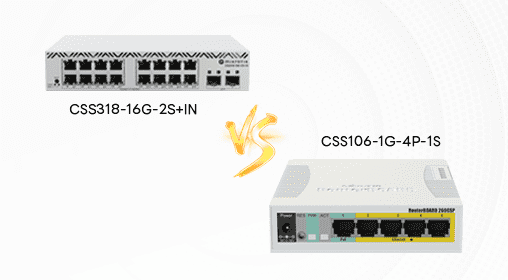
If you look at their core specifications, the difference in their design philosophy becomes clear immediately. The CSS318 is about connecting a small office, while the CSS106 is about powering it.
|
Feature |
MikroTik CSS318-16G-2S+IN |
MikroTik CSS106-1G-4P-1S |
|---|---|---|
|
Gigabit Ethernet Ports |
16 ports |
4 ports |
|
SFP Ports |
2 x SFP+ (10G) |
1 x SFP (1G) |
|
Power over Ethernet (PoE) |
No |
4 x PoE-out ports |
|
PoE Budget |
Not applicable |
Information not specified |
|
Typical Use Case |
Small office core switch, home lab with high-speed needs |
Connecting and powering PoE devices (APs, cameras) |
The physical design of these switches also tells a story about where they belong. The CSS318-16G-2S+IN has a standard, compact switch form factor designed to be mounted in a 1U rack space. Its design allows for two units to be stacked side-by-side within that single rack unit, which is a nice touch for maximizing port density in a limited space. It's built for a wiring closet or a server rack.
The CSS106-1G-4P-1S has a more niche appearance, likely reflecting its role as a power-delivery specialist. While specific dimensions and weight aren't detailed in the search results, its port configuration suggests a smaller, more desktop-oriented design, meant to be placed conveniently near the devices it needs to power, like on a shelf or mounted near a ceiling.
When it comes to features, the divergence is absolute. The standout capability of the CSS318 is its two SFP+ cages, which support 10 Gigabit uplinks. This is a significant advantage for connecting to a main network switch or a server at much higher speeds, preventing the 16 gigabit ports from creating a bottleneck. It runs MikroTik's SwOS, which is managed via a web browser and offers functions like VLANs, port-to-port forwarding, and bandwidth limitation. It's a capable, straightforward Layer 2 switch.
The CSS106's entire identity is built around Power over Ethernet (PoE). Its four Ethernet ports are not just for data; they deliver power to devices like wireless access points, IP cameras, and VoIP phones. This eliminates the need for separate power adapters at the device location, simplifying installation and reducing cable clutter. The single 1G SFP port is useful for a fiber uplink, but it's a standard gigabit port, not the 10G capable SFP+ found on the CSS318. Its feature set will be focused on managing PoE delivery.
The day-to-day experience for a user is vastly different. Setting up the CSS318 is about creating a high-density, high-speed access layer. You're thinking about how to segment traffic with VLANs and how to efficiently route 16 different connections back to your core network via a fast 10G uplink. The management experience is centered on SwOS for basic configuration.
Deploying the CSS106 is all about flexibility for powered devices. The main user experience is defined by the ability to place a security camera or an access point anywhere you can run an Ethernet cable, without worrying about proximity to a power outlet. It's the switch you use when you want to deploy a small cluster of IoT devices or create a wireless hotspot in a clean, professional manner. It's generally simpler to configure because its scope is narrower.
In terms of value, the calculation is direct. The CSS318-16G-2S+IN provides value through port density and future-proofed uplink speed. You're investing in a foundation that can handle a growing number of wired devices without slowing down your network backbone. The 10G uplinks are a feature typically found on more expensive hardware, making it a cost-effective solution for a small office that needs more than basic connectivity.
The CSS106-1G-4P-1S offers value through infrastructure simplification. The cost savings come from reducing or eliminating the need for electrical work to install power outlets near every camera or AP. You're paying for the convenience and flexibility of PoE, which can be a significant operational advantage.
So, what are their true strengths and weaknesses?
The MikroTik CSS318-16G-2S+IN is the connectivity workhorse. Its major advantage is the high number of gigabit ports combined with high-speed 10G SFP+ uplinks, which is unusual in its class. Its stackable design is a plus for expandability. The primary drawback is the lack of PoE, which means it cannot power devices directly from its ports, limiting its use in modern IoT-heavy deployments.
The MikroTik CSS106-1G-4P-1S is the power specialist. Its unbeatable strength is having all four of its data ports capable of delivering PoE, making it incredibly efficient for small-scale deployments of powered devices. Its main limitation is the low port count for data-only devices and the lack of a high-speed uplink option, which could make it a bottleneck if the connected devices need to move a lot of data.
The choice ultimately comes down to a single question: what are you connecting? If your primary need is to connect a large number of computers, printers, and servers and you want a fast backbone, the MikroTik CSS318-16G-2S+IN is the clear and logical choice. However, if you need to connect and power a handful of wireless access points or surveillance cameras, the MikroTik CSS106-1G-4P-1S is the specialized tool you need. It's a decision between raw port count and the power to run your edge devices.